
01
One screenshot at a time
Capture a single region of your display and turn visible, unselectable text into a result you can copy.
Free OCR for macOS
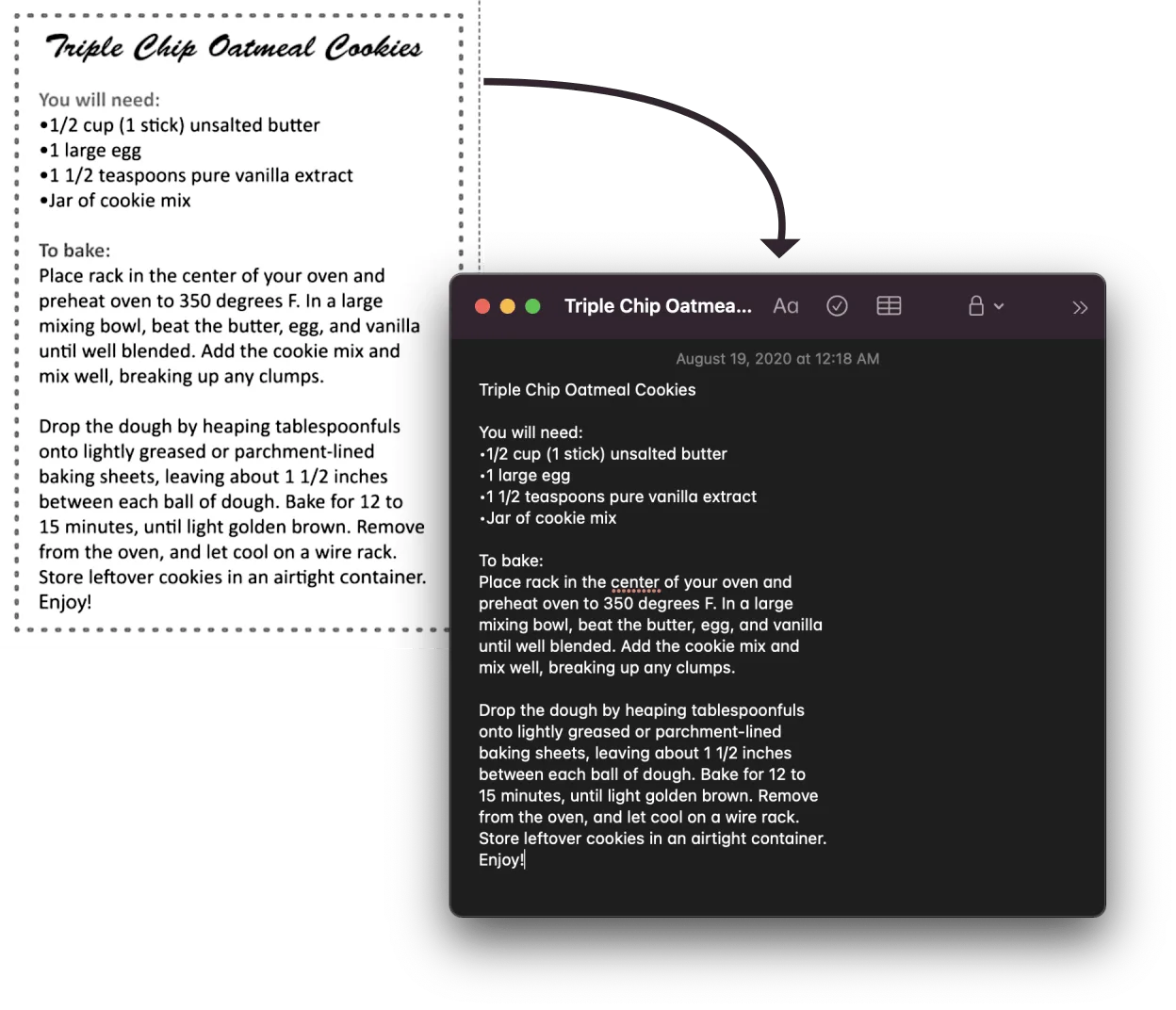
OwlOCR Core is free and suited to focused jobs: recognize one screenshot or the current page of an image or PDF, then copy and edit the text. Apple Vision recognition runs on-device on macOS 13.3 or newer.
Requires macOS 13.3+. Core is free. Direct-download Pro is $19.99/year or $49.99 lifetime; purchase in app.
Why OwlOCR
Core covers the everyday moment when a block of text is visible but copying it directly is not possible.
01
Capture a single region of your display and turn visible, unselectable text into a result you can copy.
02
Open an image, scan, or PDF and recognize the current page when you only need a specific passage.
03
Recognition with Apple Vision is processed locally on your Mac, with no online OCR upload step.
Workflow
Use a small real-world task to decide whether OCR belongs in your routine.
Install the direct-download Mac app on a Mac running macOS 13.3 or newer.
Capture a single screenshot or open an image, scan, or PDF and run OCR on the current page.
Review the recognized text, make any needed edits, and copy it into the app where you need it.
Core and Pro
The upgrade is about larger jobs, difficult input, and automation rather than unlocking basic OCR.
Core is free and suitable when you usually OCR a single screenshot or the current page of a document.
Pro adds OCR All, batch workflows, and multi-screenshot capture when a session contains 3 or more screenshots.
Pro also adds optional local OCR AI for difficult material and a CLI for workflows you want to script.
OwlOCR Core
A fit for single screenshots and OCR on the current page, using on-device Apple Vision recognition.
Download Core free →OwlOCR Pro
Direct-download Pro adds OCR All, batch workflows, optional local OCR AI, the CLI, and multi-screenshot capture for 3 or more captures. Purchase in app.
Review Pro pricing →FAQ
Yes. OwlOCR Core is free and suitable for OCR on single screenshots and current document pages.
Core is suited to a single screenshot or the current page of an image, scan, or PDF. You can review, edit, and copy the recognized text.
Yes. OwlOCR uses Apple Vision for on-device OCR processing on your Mac.
Pro adds OCR All and batch workflows, optional local OCR AI, the CLI, and multi-screenshot capture for 3 or more captures.
OwlOCR requires macOS 13.3 or newer.
Direct-download Pro is $19.99 per year or $49.99 for a lifetime license. Purchase Pro in the app.
Download OwlOCR Core for free. If your work grows beyond one screenshot or current page, purchase Pro in the app for $19.99 per year or $49.99 lifetime.