
01
Select only what matters
Draw a capture around a paragraph, receipt, slide, error message, or any other text visible on your display.
Screenshot OCR for macOS
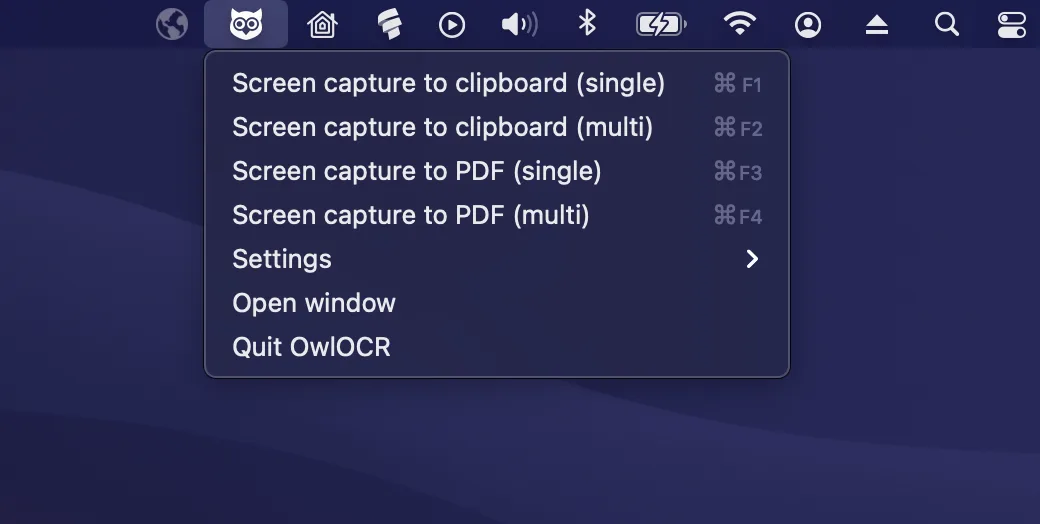
When text is trapped in a video, image, presentation, or app, select that part of the screen and run OCR. OwlOCR uses Apple Vision on-device, then gives you recognized text to copy, check, and edit.
Requires macOS 13.3+. Core is free. Direct-download Pro is $19.99/year or $49.99 lifetime; purchase in app.
Why OwlOCR
Screen OCR turns a region you can see into text you can actually use.
01
Draw a capture around a paragraph, receipt, slide, error message, or any other text visible on your display.
02
Move recognized text to the clipboard or review it in OwlOCR before using it in another app.
03
Apple Vision processes the capture locally on your Mac rather than sending the screenshot to an online OCR service.
Workflow
Grant macOS permission once, then keep OCR close by for the moments when copy and paste cannot help.
macOS requires Screen Recording permission before OwlOCR can capture an area of your display.
Start a single screen capture and drag around the exact text you want to recognize.
Copy the result, edit it, or keep working in OwlOCR without manually retyping the source.
Core and Pro
The free path covers quick screen lookups; Pro is designed for larger and more automated capture sessions.
The free Core tier suits a single screenshot or the current page, making it a useful starting point for occasional OCR.
Pro adds multi-screenshot capture for sessions with 3 or more screenshots, plus OCR All and batch workflows.
Pro also includes optional local OCR AI for difficult input and a CLI for OCR workflows you want to automate.
OwlOCR Core
A fit for single screenshots and OCR on the current page, using on-device Apple Vision recognition.
Download Core free →OwlOCR Pro
Direct-download Pro adds OCR All, batch workflows, optional local OCR AI, the CLI, and multi-screenshot capture for 3 or more captures. Purchase in app.
Review Pro pricing →FAQ
Start a single screen capture in OwlOCR, select the region containing the text, and copy or edit the recognized result.
macOS requires Screen Recording permission for apps that capture visible screen content. OwlOCR needs that permission for its screen capture workflow.
OwlOCR Core is free and suitable for single screenshots. Pro adds multi-screenshot capture for 3 or more captures, OCR All, batch workflows, local OCR AI, and the CLI.
Apple Vision OCR processing happens on-device. Pro also offers an optional OCR AI model that runs locally on your Mac.
OwlOCR requires macOS 13.3 or newer.
Direct-download Pro is $19.99 per year or $49.99 for a lifetime license. Purchase Pro in the app.
Download OwlOCR Core for free and try it with one screenshot. If screen OCR becomes a regular workflow, purchase Pro in the app for multi-capture, local AI, batch, and CLI tools.