OwlOCR v4.5, birthday edition 🎂🎉, released!


OwIOCR Release 4.5
The 1 year birthday edition! 🎂🎉
A whole new way to use the app - Finder Extensions
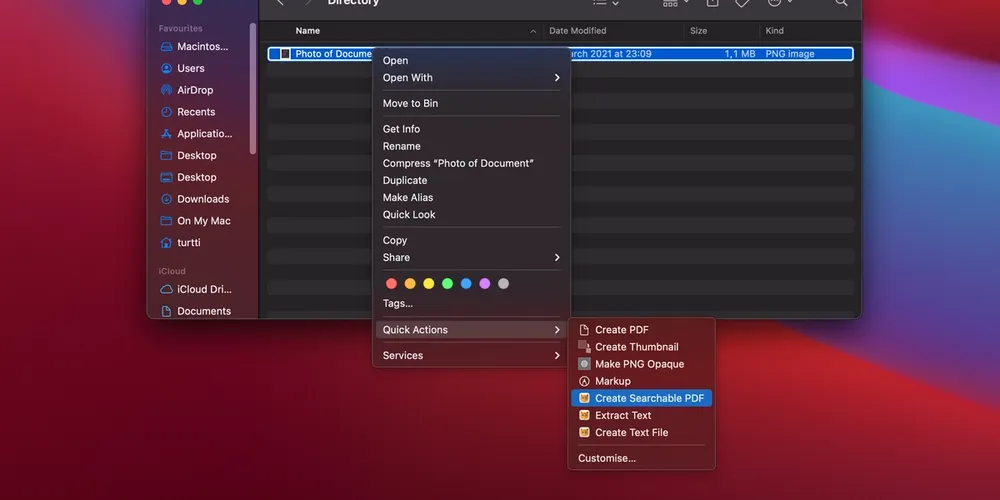
For the first time OwlOCR actions can be used directly from the Finder. Create searchable PDFs, extract text from files to clipboard or plain text files - with only a couple clicks needed in Finder.
- Select image or PDF files.
- Right-click and select the action from Quick Actions.
The output files will be placed in the same directory and the original files are always preserved.
Please note that the extensions must be enabled in System Preferences > Extensions before they are shown in the Finder.
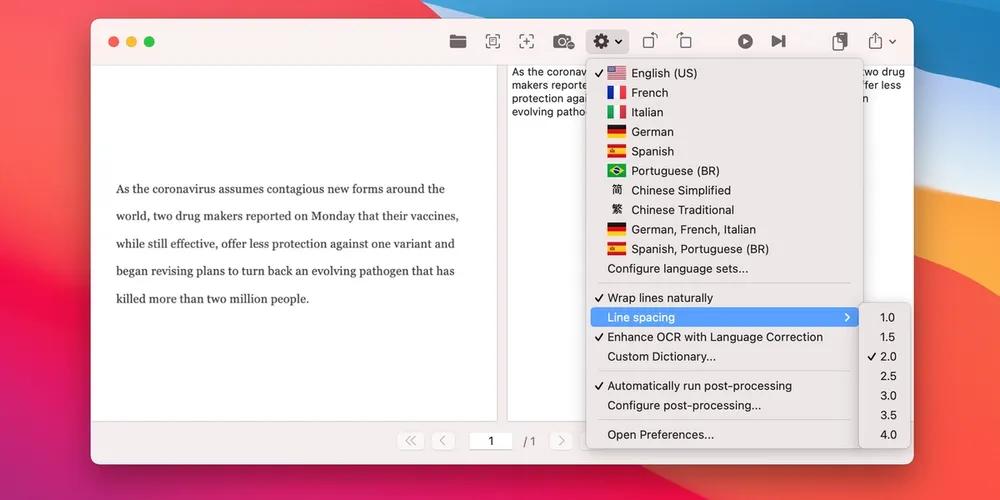
Post-processing Smart Quotes
OwlOCR now offers the option of including Smart Quotes post-processing. This means replacing quotes with the quote style specified at the system level.
Export to Text Files
In addition to the previous option of exporting to searchable PDF files, OwlOCR now also supports saving the results to a text file. This can be triggered from the new Finder extensions for image and PDF files or right from the app for any valid inputs.
A word of gratitude
It's unbelievable that it's been a year already of improving this app.
The app has grown leaps and bounds, perfecting the features and adding a lot of new things along the way.
Thank you for all of your support whether that's been a kind email, reporting a bug, sharing the word, providing media publicity or purchasing the Pro license.
I couldn't do it without you and I wouldn't do it if it wasn't for you.